


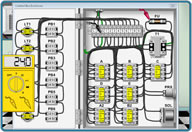

Power supply troubleshooting CNCWhere are the power supplies located?Most machine tools have multiple power supplies. Here are some of the usual locations. Most are 24VDC, some control circuits are 5 and 12VDC.
|
||
|
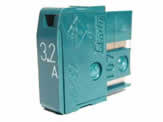
How to check and troubleshoot DC power suppliesFirst check for power and correct voltage on the input side of the power and supply. Then check the output or secondary side. If there is no power or the voltage reading is low disconnect the output wires with the power off. Then power up and recheck the output side. If power is present and it is the right voltage then a short to ground on the output side exists which draws the power down. Most power supplies will have an LED on them or on the circuit board. This is usually the quickest indication of whether 24VDC is coming out of it or not. But don't let it fool you check it with a meter to be sure. If there is any short to ground, one of two things will usually happen. If there is a fuse for this circuit it will blow or if the power supply is internally protected it will only draw down the voltage. If this happens the LED will not be lit or be dimmer then it should be. Quick check is to power down and disconnect the wires on the output side and power the machine back up. If the LED goes on that tells you there is a short. To troubleshoot an electrical short see Troubleshooting Electrical shorts. If the voltage is low. The incoming power may be supplied by another transformer. Check this transformer to see if there are taps on the incoming or primary side that may be moved to match the correct incoming power. Measure the incoming voltage and set the primary taps if available to the closest setting. For example primary taps can have a 210/220/230/240 Tap. Normally the voltage reading is + or - 2 volts. Voltage on 24VDC power supplies should not drop below 20VDC, if it does you will generally run into problems. Many times fuses are blown. Typically they are Daito brand fuses. These are not cheap so you should troubleshoot with a meter checking the circuits to ground to eliminate the costs of purchasing these daito fuses. |
|