|
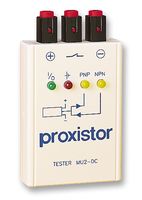
Indicating led on prox may work, but it doesn't always mean the switch is good.
First you need to determine:
-
Is it PNP?
2-wire-Positive voltage in Positive out to machine PLC input
3-wire-Positive and negative in from power supply Positive out to machine input
-
Or NPN?
2-wire-Positive voltage in Positive out to a Machine PLC Input
3-wire-Negative and positive in from power supply Negative is output to machine input
Testing
Once you figure out if it is NPN or PNP then you will know what the voltage is supposed to be going to your input on your machine. You will also need to figure out if it is Normally open or normally closed. The below testing assumes its normally open. and 24VDC prox . Set Meter to correct voltage before testing.
-
PNP Connect one lead of your meter to 0vdc and connect the other lead to the output wire of the prox (input to the machine). In some cases the prox may drop the voltage by a couple volts. For example 24vdc in and 22vdc coming out? this is OK. Make sure you check that the off state is 0vdc on your meter, proxies usually fail on.
-
NPN Connect one lead of your meter to +24vdc and connect the other to the output lead of the prox (input to the machine). If you get +24vdc then Prox is on. Make sure you check that the off state is 0vdc on your meter, proxies usually fail on. Keep in mind that when the prox is not active if you check the output lead to 0vdc you will show 24vdc on your meter. This will check that your input card on your machine has power.
Need to locate some of the most common used limit switches for machine tools. Visit some of the switch links below.
|
 |
... |
|